alpha This is a new service - your feedback will help us to improve it...

  1. Make a positive impact with the Climate friendly switcher.
    Save energy and conserve bandwidth for faster browsing.
    Click here to see more
  2. Home
  3. Contact Us
  4. Search
Contact Us
  1. Personal and Life Changes
  2. Personal Information & Skills
  3. Family Information and entitlements
  4. Service Records
  5. Flexible Service
  6. Accommodation
  1. Absence, Health and Wellbeing
  2. Time Off
  3. Parenthood
  4. Health
  5. Welfare support
  6. Flexible Working
  1. Updating contacts
  2. Emergency contact details
  3. Next of Kin
  1. Pay, Allowances and Charges
  2. About pay
  3. Allowances
  4. Expenses
  1. Benefits
  2. Your Armed Forces Pension
  3. Armed Forces Compensation Scheme
  4. Armed Forces Service Benefits
  1. Career
  2. Learning & Development
  3. Job related information
  4. Medals and Badges
  5. Reserves
  6. ID Cards
  1. Leaving the service
  2. Planning to leave
  3. Early termination
  4. Termination
  5. Resettlement
  6. Support for leaving the service
  7. P45
  1. System and Support
  2. Portal Support
  3. JPA Support
  4. Service Updates and Operational Bullletins
  1. FAQs
  2. Personal and Life Changes FAQs
  3. Absence, Health and Wellbeing FAQs
  4. Pay, Allowances and Charges FAQs
  5. Benefits FAQs
  6. Career FAQs
  7. Leaving the service FAQs
  8. System and Support FAQs
  1. Guidance and Forms
  2. Policy information
  3. Forms
  1. pizza

Advance of salary

  1. Home
  2. Pay, Allowances and Charges
  3. About pay
  4. Advance of salary

About pay

  • Bank account information
  • Online payslips and P60s (including P11Ds)
  • Pay deadlines
  • Salary Basic Pay
  • X-Factor
  • What to do if pay is wrong?
  • Advance of salary
  • Emergency Payment in Cash (EPIC)
  • Financial Incentives
  • Recruitment and Retention Payments
  • Mobilised Reservists Financial Assistance Claim
  • Savings and Voluntary Deductions
  • Managing overpayments
  • Cheques

What you need to know

You are able to request an advance of pay if required.

It is important that you have read and understood JSP 754 Tri-Service Regulations for Pay before proceeding.

The recovery of this advance is processed in a single transaction at the next monthly payroll run, appearing as a deduction for the full amount from pay on your next pay statement.

What you need to do

You need to obtain the approval of your Commanding Officer (or delegate) by completing form JPA E004. Once the form is approved it is retained by your Unit HR Admin and you can proceed to apply for the Emergency Payment to Bank (EPTB) on JPA. To do this:

  • logon to JPA
  • select JPA Expenses
  • select Expenses Home

home

  • click Create New Expense Claim

new claim

  • the iExpense Help button is available throughout should you require assistance
general

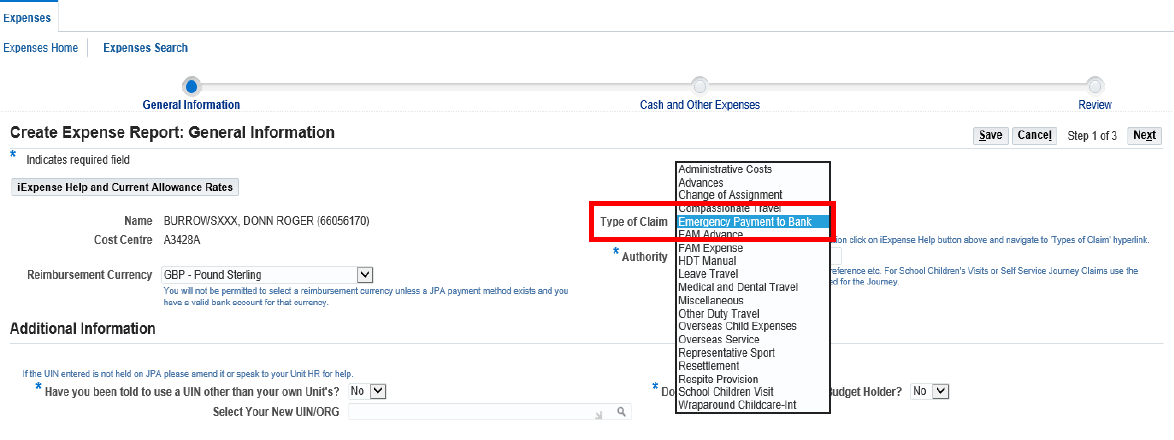
  • select GBP - Pound Sterling as the Reimbursement Currency from the List of Values (LOV)
    • this field defaults to GBP – Pound Sterling
  • select Emergency Payment to Bank from the Type of Claim drop down menu
  • enter the Date the JPA Form E004 was authorised, along with the Authoriser’s Appointment/Position as the Authority for the claim. As an example, the authority on JPA should read; 10 Jan 23 – CO 2 YORKS
  • if claiming against your Unit's Identoty Number (UIN) then click Next
  • if claiming against another UIN:
    • do you need to change your UIN?
    • enter the new UIN in the Select your new UIN/ORG field and click on the Torch symbol to search for your Unit/UIN
    • select Y/N to Do you have the authority of the Budget Holder? question
    • click Next

The Cash and Other Expenses screen will appear

icon

  • click the Details icon

lie

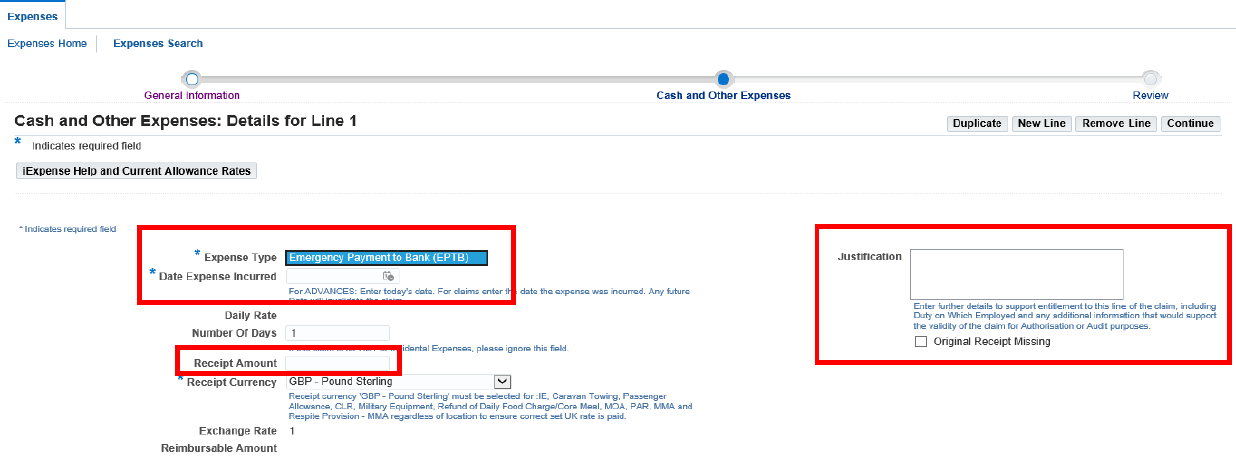
  • select Emergency Payment to Bank (EPTB) from the Expense Type LOV Enter the date the JPA Form E004 was authorised in Date Expense Incurred field
  • enter appropriate details in the Justification free text box
  • enter 1 in the number of days claimed and GBP - Pound Sterling as the receipt Currency
  • enter the value of the EPTB amount authorised in the Receipt Amount
  • check the details and if you are content that it is accurate and in accordance with extant policy
  • click Next
  • read and click the I accept the Terms & Conditions box
  • click Submit

The claim will now be sent for checking by an Expense Authoriser before being approved for payment.

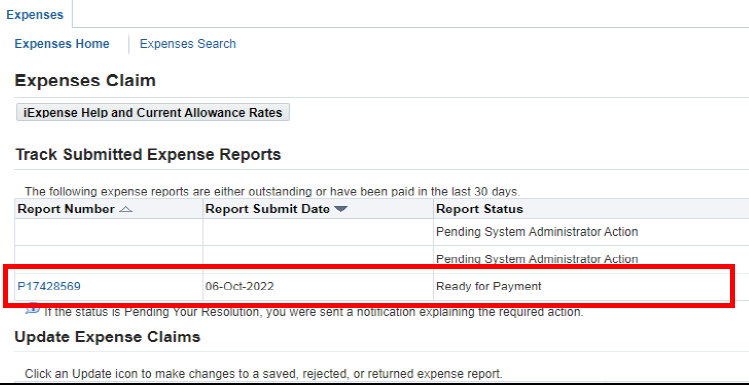
Payment and expenses Report Number.

  • once the claim has been approved by an Expense Authoriser, the payment will be made in accordance with routine JPA Expense Claim timelines.

The payment progress can be viewed in JPA Expenses, Track Submitted Expense Reports

  • you are required to provide your Unit HR Admin with the claim Report Number, once the claim has been approved and is ready for payment
cl


Related Content

  • JPAE004 Apply for an advance of pay or early payment in cash (EPIC)

Did you find this page useful?

Like sign Dislike sign

Your vote is submitting…

Your opinion is submitting…

Thank you for submitting your opinion.

Back to top
Defence Business Services Logo
  • Contact Us
  • Privacy notice
  • Site Map
  • Accessibility statement
  • Cookies statement
Powered by SSCL logo
Coat Of Arms

All content is available under the Open Government Licence v3.0, except where otherwise stated.

We use cookies to collect information about how you use this website. We use this information to make the website work as well as possible. Tell us whether you accept these cookies.

Set cookie preferences