What you need to know
All Service personnel who are permanently assigned to an overseas location and in receipt of permanent rates of Local Overseas Allowance are eligible for Respite Provision (RP), together with any accompanying immediate family.
It is important that you have read and understood JSP 752 Tri-Service Regulations for Expenses and Allowances (chapter 9, section 5) before proceeding.
RP is designed to contribute towards your travel and accommodation costs when you want to take a break away from your permanent overseas station.
You will receive a contribution towards the cost of travelling to the location where you are going to take respite and the accommodation costs when you are there. Each country has a set number of RP days and a capped monetary daily rate. The rates for each country can be found in JSP 752, chapter 3, section 1.
You can travel by air (economy class), car, rail (standard class), bus, coach or taxi. Accommodation can be either in a hotel, Bed and Breakfast, as part of a package deal or something similar.
RP is not to be combined with any other travel entitlements, such as Get You Home Overseas to fund travel by yourself and/or your immediate family.
What you need to do
You can submit your claim via JPA, remember that the iExpense Help button is available throughout should you require assistance:
- logon to JPA
- select JPA Expenses
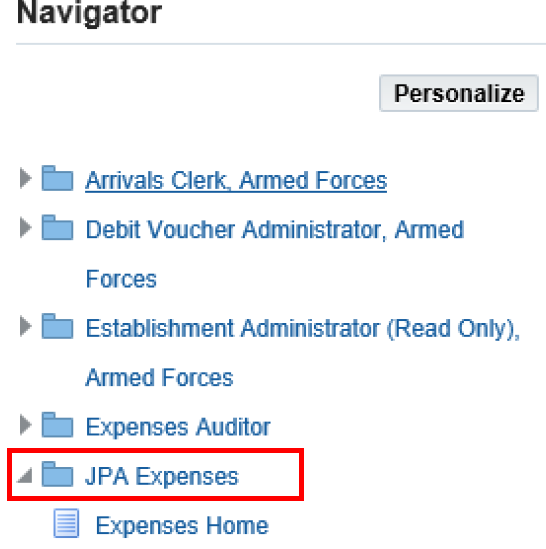
- click Create New Expense Claim

The Expenses home screen will be displayed.
The Reimbursemen.t Currency will default to GBP – Pound Sterling, however, if you have an overseas account set up to receive allowance claims, this can also be used
- select Respite Provision from the Type of Claim list of values (LOV)
- enter the Respite Approval Number (not the Claim Number) obtained from your Unit HR in the Authority field. The Respite Approval Number is found by selecting ‘JPA Self Service’, ‘My Home & Travel’, ‘Respite Provision’ and selecting ‘Respite Approval Number’
- in the Additional Information section complete all applicable fields. Only valid and available to claim travel numbers will be visible in the drop down
- click Next
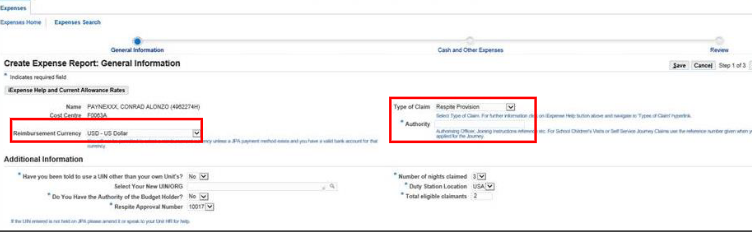
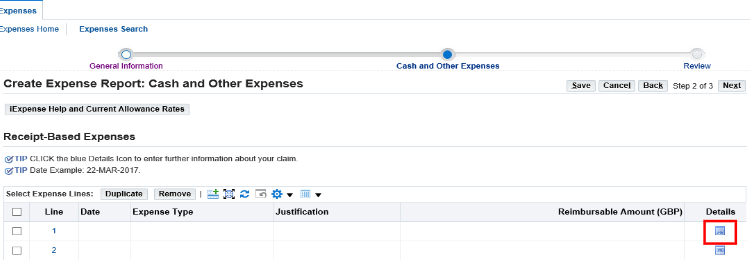
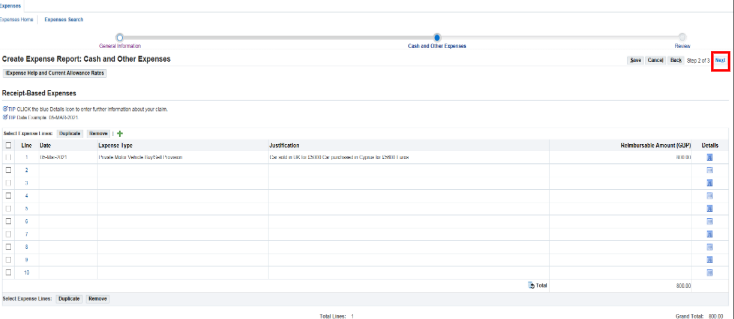
The Create Expense Report: Cash and Other Expenses screen will appear.
- click on line 1 Details Box
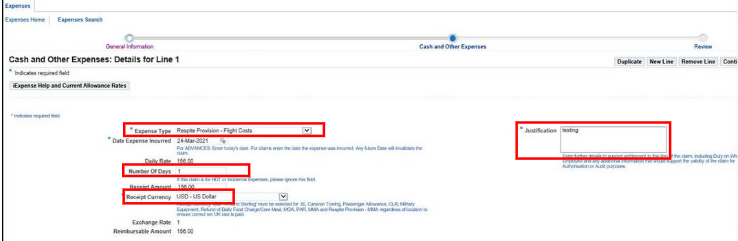
- from the Expense Type LOV select the appropriate claim type (flight costs, hotel costs etc).
Note: if part of your claim is to include MMA it is advised that you enter this first, so that you can ensure other lines are adjusted to meet the capped limit (assuming you are looking to claim the full amount permitted). This is because the MMA reimbursable amount is based on the mileage figure you enter, thus is more complex to adjust to an exact amount. Other costs, such as hotel costs, can then be adjusted to meet the capped limit (assuming your total costs have exceeded it). For example
- the claim total is now equal to the capped limit; by claiming MMA first and generating the exact reimbursable amount for MMA, the precise remainder permissible is far easier to deduce
- 2nd line: claim for the remainder, up to the 200€ limit, under hotel costs= 136.80€
- 1st line: claim for 126 miles MMA = 63.20€ (for the sake of this e.g.)
- the country in question has a capped limit of 100€, per person, per night and 2 eligible people have stayed in a hotel for 1 night (costing 180€) and drove 126 miles to get there
Therefore, the total respite claim cannot exceed 200€ (100€ per person, per night x 2 eligible people).
- enter the Date Expense Incurred(the last day of respite)
- enter Receipt Amount: if you have an overseas bank account for allowances this can be paid in that currency, if not this will be converted to GBP – Pound Sterling on later screens
If your receipt currency is neither GBP or the currency of your assigned location, you will need to convert this the amount to GBP (or the currency of your assigned location if you have local bank account set up to receive allowance claims) and enter the converted amount accordingly.
- enter the travel number issued by Unit HR in the Justification Box and any other information you feel may be pertinent for an authoriser/auditor
The Cash and Other Expenses details screen will be displayed again with the claims listed so far. Add any further claim lines in the same way, ensuring you don’t exceed the total capped limit for total number of nights and eligible people.
- click Continue
The Create Expense Report: Review page will be displayed.
- check the details are correct and tick the T&C box, if content
- press Submit to be taken to the Expense Report Confirmation page
If you don’t have access to JPA, then you need complete JPA Form F016 and submit it to your Unit HR Admin selecting Expense Type 83 - 96 Respite Provision and Respite Provision as the Type of Claim.
If you have a Defence Gateway account you can submit expenses from your own personal device on the MyExpenses app (part of the My Series).
