State funded schools in England offer a free meal to every primary school pupil in reception classes, year 1 and year 2. The purpose of this reimbursement is to ensure that you aren’t disadvantaged when you are serving overseas in an area where you have to pay for meals at your child’s school or where MOD schools are unable to offer catering.
Where the meal is provided by the school you are entitled to a refund of the actual cost of the meal. An invoice or receipt is required.
In schools without facilities to provide meals, a refund of £2.30 per meal can be claimed. This is in line with government funding allocated to schools in England. The claim amount should be converted into local currency using the Forces Fixed Rate. In the absence of a Forces fixed rate, the Garrison accounting rate for the relevant country should be used. Claimants can only claim for days that a child has attended school. Proof of attendance is required.
complete the application form at Annex A, which then needs to be signed off by your Commanding Officer
Once sign off has been received, you need to submit a claim each month or each term via JPA. To do this:
logon to JPA
click JPA Expenses
click Create New Expense Claim
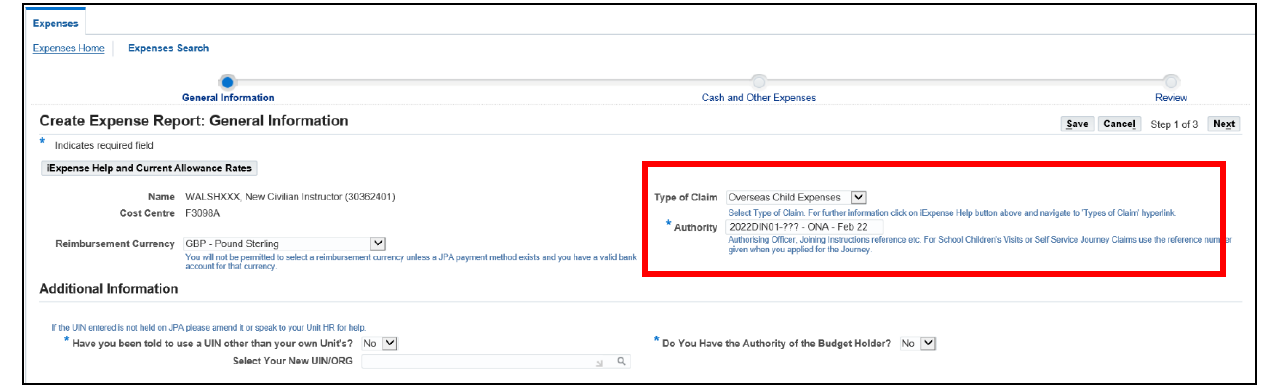
populate the General Information screen
change the Type of Claim to Overseas Child Expenses
enter the authority and period claiming into the Authority field. For example: 2022DIN-01-008 – ONA – Feb 22
do NOT change ‘Have you been authorised to use a UIN other than your own Unit’s?’, ‘Do you have the authority of the Budget Holder?’, or ‘Select Your New UIN/ORG’ within the ‘Additional Information’ area. Funding allocation is automatically attributed to the correct UIN on submission
click next
populate the Cash and Other Expenses screen
click either the line number or the blue square to enter an expense line
select Overseas Nursery Authority (ONA) or Universal Infant Free School Meal (UIFSM) from the Expense Type drop down box (dependant on claim being made)
enter the date of the invoice into the Date Expense Incurred field
enter the Receipt Amount
ensure the correct Receipt Currency is selected
populate the Justification field with:
child’s full name
child’s date of birth
month claiming for (for example Feb 22)
click Continue
review Claim Line
check details presented on each claim line
once content click Next
submit expense claim
review detail of the Expense Claim
once content with the claim contents, read the Terms and Conditions and if acceptable click the I accept the Terms and Condition of the MOD’s Travel and Expense Policies
click Submit
If you don’t have access to JPA, you should speak to your administration unit and arrange for refunds to be paid under local arrangements.
If you have a Defence Gateway account you can submit expenses from your own personal device on the MyExpenses app (part of the My Series).
We use cookies to collect information about how you use this website. We use this information to make the website work as well as possible. Tell us whether you accept these cookies.