All Regular Service personnel, Full Time Reserve Service (Full Commitment) and entitled civilians are eligible for reimbursement of nursery fees when they are assigned overseas and there is no MOD provided school or facility available for any 3 or 4 year old children accompanying them. This is to ensure that you aren’t disadvantaged when you are serving overseas compared to what you would have access to if you were serving in England.
You can only claim this reimbursement if you are using registered, regulated and inspected childcare settings.
If both parents are working, you will be refunded for the cost of up to 1140 hours of nursery fees over a 12-month period for each 3 and 4 year old (term time only). If just one parent is working, you will be refunded 570 hours. Children become eligible from the term following their third birthday.
In addition to tuition fees, you will also be reimbursed for:
any registration/enrolment fee(s)
processing fees
insurance fees
material fees
What you need to do
In order to apply, before enrolling your child in a nursery you should complete Annex A to 2022DIN01-008 and get this signed off by your Commanding Officer.
If you are claiming over the 570 hours entitlement (or 1140 hours if appropriate), Annex B must also be completed.
NEED TO ACCESS THE DIN TO LOOK AT THE FORM - SHOULD WE BE LINKING THE FORM TO THIS PAGE ALSO IR JUST THE DIN AND THE SP THEN TAKES THE FORM FROM THE ANNEX?
Once sign off has been received, you need to submit a claim each month or each term via JPA. To do this:
logon to JPA
click JPA Expenses
click Create New Expense Claim
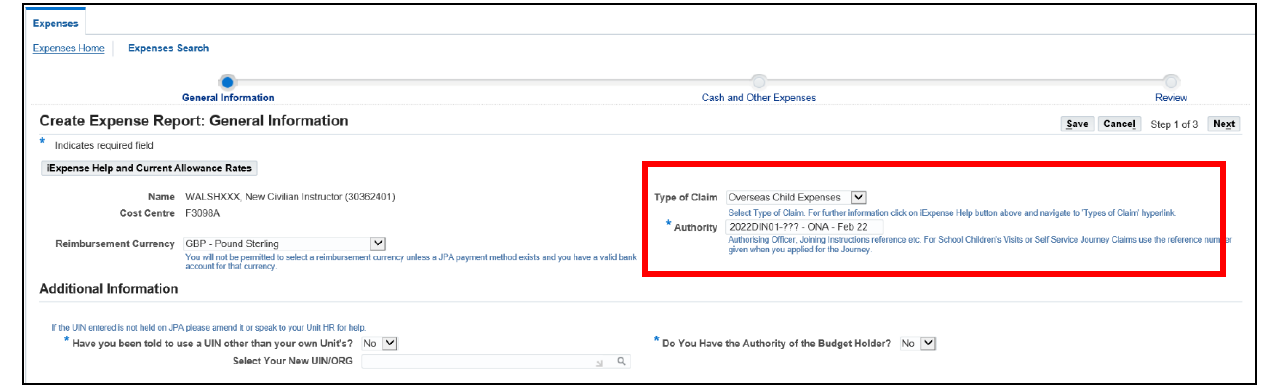
populate the General Information screen
change the Type of Claim to Overseas Child Expenses
enter the authority and period claiming into the Authority field. For example: 2022DIN-01-008 – ONA – Feb 22
do NOT change ‘Have you been authorised to use a UIN other than your own Unit’s?’, ‘Do you have the authority of the Budget Holder?’, or ‘Select Your New UIN/ORG’ within the ‘Additional Information’ area. Funding allocation is automatically attributed to the correct UIN on submission
click next
populate the Cash and Other Expenses screen
click either the line number or the blue square to enter an expense line
select Overseas Nursery Authority (ONA) or Universal Infant Free School Meal (UIFSM) from the Expense Type drop down box (dependant on claim being made)
enter the date of the invoice into the Date Expense Incurred field
enter the Receipt Amount
ensure the correct Receipt Currency is selected
populate the Justification field with:
child’s full name
child’s date of birth
month claiming for (for example Feb 22)
click Continue
review Claim Line
check details presented on each claim line
once content click Next
submit expense claim
review detail of the Expense Claim
once content with the claim contents, read the Terms and Conditions and if acceptable click the I accept the Terms and Condition of the MOD’s Travel and Expense Policies
click Submit
If you don’t have access to JPA, you should speak to your administration unit and arrange for refunds to be paid under local arrangements.
If you have a Defence Gateway account you can submit expenses from your own personal device on the MyExpenses app (part of the My Series).
We use cookies to collect information about how you use this website. We use this information to make the website work as well as possible. Tell us whether you accept these cookies.