When JPA recognises an Early Service Leaver (ESL), an automated workflow notification will be generated, where they will be required to complete directed resettlement tasks.
What you need to do
To review MOD Form 1711 Resettlement Summary you need to:
navigate to Self Service - Employee, Armed Forces_Resettlement_F1711 Summary
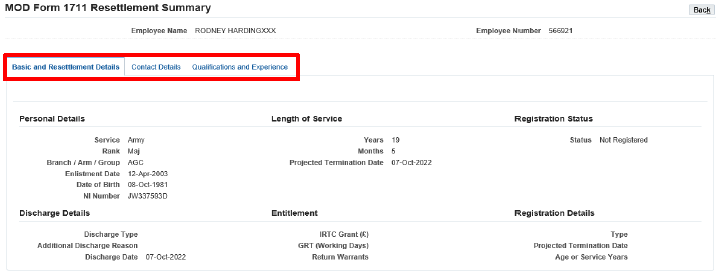
You will then need to select the area you wish to review. There are 3 areas contained on the MOD Form 1711, please see below.
What you need to do
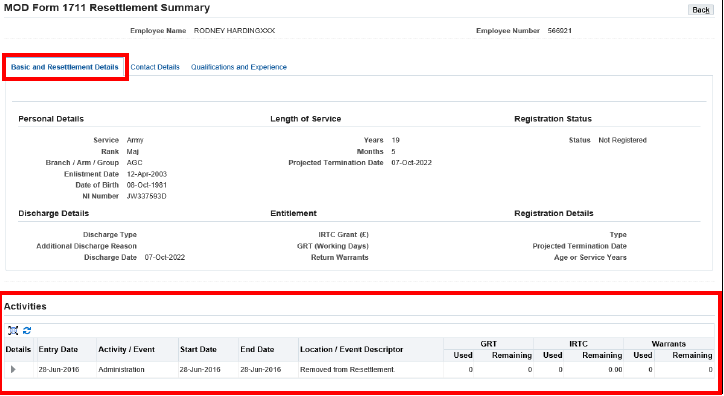
To review basic and resettlement details you need to:
click Basic and Resettlement Details tab
Check the following areas:
personal details
discharge details
length of service - this will display the value expected on the date of termination
entitlement
Officers with prior service in the ranks (including Officers Commissioned from the Ranks (OCFR) and time spent at Dartmouth, Lympstone, Sandhurst or Cranwell) may not have this service included on their JPA record. If prior Officer service is not recorded on JPA it might impact on the activation of Resettlement entitlements.
You should raise this issue in accordance with the guidance provided for raising observations.
registration Status – this will change to Registered following your first Resettlement interview and your confirmation of that interview
registration details
report observations (if applicable)
Early Service Leaver (ESL) should report observations to the UEC (need full terminology for UEC). Service Leaver (SL) should report observations to the SRA (is this Service Resettlement Adviser?)
Any Resettlement activities that take place throughout your Resettlement period can be viewed in the activities box at the bottom of the screen. It is also helpful for keeping a check on how much Graduated Resettlement Time (GRT) you have taken, Individual Resettlement Training Costs (IRTC) spent and the remaining number of warrants available to you.
What you need to do
To review contact details you need to:
click Contact Details tab
There are 3 Contact addresses to be reviewed, Unit Contact Details, SRA Contact Details and Post Discharge Contact Details.
check Unit Contact Details - this should be the Parent Unit details
check SRA Contact Details - This should be the SRA address administering the Service Leaver. Amendment of any of these addresses should be directed through the SL/ESL Unit HR Administrator
check Post Discharge Contact Details. This is maintained by the individual through Self Service
There is also an option to report observations (if applicable).
ESL should report observations to the UEC. SL should report observations to the SRA.
What you need to do
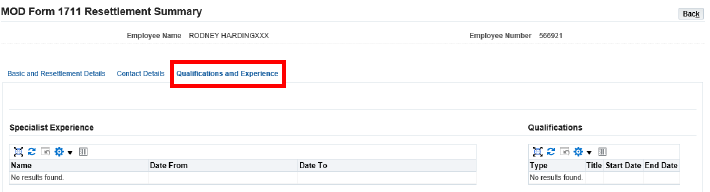
To review qualifications and experience details you need to:
click the qualifications and experience tab
check specialist experience
check qualifications
report observations (if applicable)
ESL should report observations to the UEC. SL should report observations to the SRA.
We use cookies to collect information about how you use this website. We use this information to make the website work as well as possible. Tell us whether you accept these cookies.