What you need to know
Early Service Leavers (ESLs) are defined as Service Leavers who are discharged at:
- own request - Service Person (SP) discharged at their own request from the trained or untrained strength, having completed less than 4 years service
What you need to do
Please follow the below steps for resettlement as an ESL.
View workflow notification ‘SP status has changed to Early Service Leaver’
You will need to view your workflow notification and the following screen will be displayed:
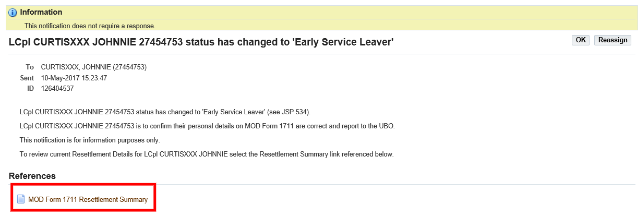
- Read the screen and access your resettlement summary
- click MOD Form 1711 Resettlement Summary
- Review MOD Form 1711 Resettlement Summary
- check all details are correct in the Resettlement Details, Contact Details and Qualifications and Experience screens (for further details please click here)
- fclick Back
- return to workflow notification ‘SP status has changed to Early Service Leaver’
- click OK
- Arrange mandatory briefing with UBO (what does UBO stand for?)
- liaise with LM and UBO for a convenient time–this is a mandatory briefing and must be conducted at the earliest opportunity
- Attend mandatory briefing with UBO
On completion of the mandatory briefing with the UBO a JPA workflow notification will be received.
View workflow notification Action Required: ‘SP to complete MOD Form 1173A Actions’
You will need to view the workflow notification and the following screen will be displayed:
Update Post Discharge Address
- click Enter Post Discharge Address. For further information please click here
Review MOD Form 1711 Resettlement summary
- click MOD Form 1711 Resettlement Summary. For further details please click here
Review MOD Form 1773A Record of Mandated Resettlement Brief
- click MOD Form 1773A Record of Mandated Resettlement Brief and the following screen will be displayed:
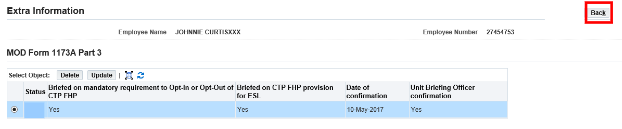
- review the content
- click Back
Accept Briefing Summary
To accept briefing summary you will need to:
- click workflow notification Action Required: ‘SP to complete MOD Form 1173A Actions’. The following screen will be displayed:
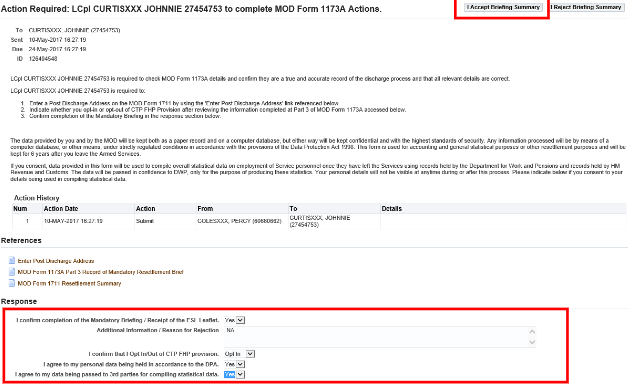
- complete the ‘I confirm completion of the Mandatory Briefing/Receipt of the ESL Leaflet ’ box
- complete the ‘I confirm that I Opt In/Opt Out of CTP FHP provision’ box
- complete the ‘I agree to my personal data being held in accordance to the DPA’ box
- complete the ‘I agree to my data being passed to 3rdparties for compiling statistical data’ box
- if you need to add any additional information or reject any of the data contained in the Interview Forms then you should also complete the free text box entitled Additional Information/Reason for Rejection
- click ‘I Accept Briefing Summary or I Reject Briefing Summary’
Selecting ‘I Reject Interview Summary’ will generate a workflow notifying the UBO.A further interview will then be required to discuss the reason the interview summary has been rejected.
