What you need to know
Any Single Lump Sum Payment (e.g. FRI), pension lump sum and/or resettlement commutation payment will be paid into the bank account(s) held on JPA.
Split of Net Pay
If an individual has a split in their pay between 2 (or more) accounts, this same split will be applied by JPA to the Single Lump Sum Payment (e.g. FRI), pension lump sum and/or resettlement commutation payments.
Overseas bank accounts
If the JPA allotted bank account is overseas – JPA will make these payments to the allotted overseas accounts. It will then be the responsibility of the individual (at their own expense) to move the money back to a UK account if that is where they wanted the money.
Pens Form 1
The Pens Form 1 completed prior to discharge requests details of a nominated bank account; these details are strictly for the payment of the monthly pension which will be paid by the Pension Paying Agent and will not action any change to JPA.
You are required to review your banking instructions held on JPA prior to your discharge in order that the terminal benefits and/or resettlement commutation payment are paid to the account to which you wish them to be paid.
You cannot create or delete bank accounts. To do this you will need to refer to your Unit HR Admin.
What you need to do
To update your UK main bank account details, you will need to:
- logon to JPA and navigate: JPA Self Service - Employee, Armed Forces
- select Payroll Information and click Bank Account Information
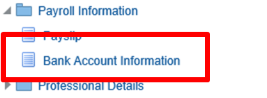
The 'Manage Payroll Payments: Define Payments' screen is displayed. This will allow you to view and update your existing main UK Bank Account details.
Please note that in order to just view your Bank Account Information, users will still need to click the update icon to carry out this function.
You should note that changes to Bank Accounts by Self Service Users can only be made between 1st of the month and the date when the Pay Run occurs. If you wish to view your account details after this point, this should be done by either viewing your most recent Payslip by clicking the Payslip link shown below or by contacting your Unit HR Admin.
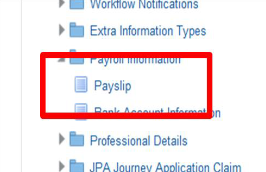
If you are attempting to update your account details for a future pay period you should seek the advice of your Unit HR Admin.
You will then need to:
- click on the Pencil icon under the Update column
The Update Bank Payment screen is displayed.
- enter the name of your Bank in the Bank Name field
- click the Magnifying Glass to the right of the field
The Search and Select: Bank Name screen will be displayed showing a list of suitable Bank Names.
- click the relevant radio button to select the appropriate Bank
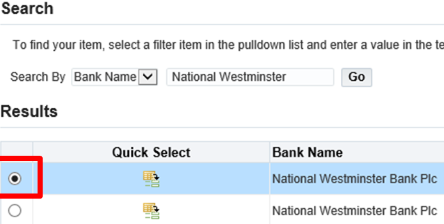
- click Select
The Update Bank Payment screen will be displayed showing your bank name.
- enter the 6 digits of your Bank's Sort Code in the Bank Branch field
- enter Sort Code with a % symbol at the beginning of the 6 digits and the same symbol at the end
- click the relevant radio button in the Select column to select the appropriate Bank Branch
The Update Bank Payment screen will display showing your Bank Branch.
- enter further details as appropriate - for example, Account Number, Account Name
You should ensure that the Account Name field on JPA contains the Account Holders Name and the Building Society Account Number field contains the Roll Number for your Account.
This applies even where your banking institution is now classified as a Bank but was formerly a Building Society. If this information is not entered correctly it could cause a delay when making payment to these accounts.
Once completed this, you will need to:
- click Apply
A warning notice will appear reminding you that only UK Main Bank Accounts can be updated.
- click Continue
A review screen will appear showing the updated details you have input.
- click Submit
A confirmation screen will appear stating that your update has been successful.
Please note: If you have already set up a Foreign Bank Account you will not be able to view the details as per the screens above. To check that the details are correct contact your Unit HR Admin who will be able to access them for you. It will not be possible to set up a Foreign Bank Account through Self Service - if you wish to do this then you should contact your Unit HR Admin.
