Whenever you incur expenditure for which you wish to be reimbursed you will need to submit an iExpense claim on JPA.
It is important that you have read and understood JSP 752 Tri-Service Regulations for Expenses and Allowances before proceeding.
The majority of claims will be auto-approved within the expenses workflow providing the following criteria has been met:
- your name is not held on the Authorisation Required List (ARL)
- none of the lines within the claim breaches any of the policy limits
- less than 4 claims have been made in any 31 day period
- you are not within 120 days of your termination date
- the total value of the claim is less than £2000
In these circumstances JPA will automatically make a payment, which will be processed into your nominated expenses bank account within 3 working days of the date of submission on average. Claims that do not meet these criteria will be passed for authorisation, and once authorised will be processed as above.
All original receipts and/or supporting documentation must be retained by the Service Person for 24 months from the date of submission of the claim.
Entitlement to refund of expenses or allowances is laid down in regulations published in JSP 752 and rates are published in JSP 752 and MOD Directed Letters. Individual claims are to be limited to the entitlements outlined in the regulations. Any failure to comply with the regulations will be investigated and may result in disciplinary action.
WHAT YOU CAN'T CLAIM FOR? - Kate
What you need to know
JPA Expenses automatically selects certain claims to be sent for Authorisation prior to payment, and in addition randomly selects 5% of claims for Audit.
Claims could be selected for authorisation or audit in the following circumstances:
- the total value of the claim exceeds £2000
- the cumulative total value of all claims made in the last 31 days exceeds £2000
- the Individual has been manually placed on the Authorisation Required List
- the Individual has been selected as requiring all claims to be audited as a result of exceeding 4 claims (i.e. 5 or more) in any rolling 31 day period
- any item within the claim exceeds the Policy Limits defined in JSP 752 or set locally
- any item within the claim exceeds Policy Limits added to increase the likelihood of incorrect claims being picked up
- a random 5% of expense claims are sent for audit irrespective of the selection for authorisation
- all advances submitted irrespective of amount
Notice that a claim has been selected for Audit is sent by Workflow. This will appear in your Self Service Notifications window and within Expenses.
It is your responsibility to check your notifications regularly to see if any of your claims have been selected for audit.
If a claim is selected at random for audit, JPA will normally show this at once after submission.
If a claim is selected for Audit after being authorised for payment, this will appear on JPA once the claim has been authorised. This may be some days after the claim was made.
What you need to do
To check your notifications:
- logon to JPA
- click JPA Self Service - Employee, Armed Forces
- select Workflow Notifications
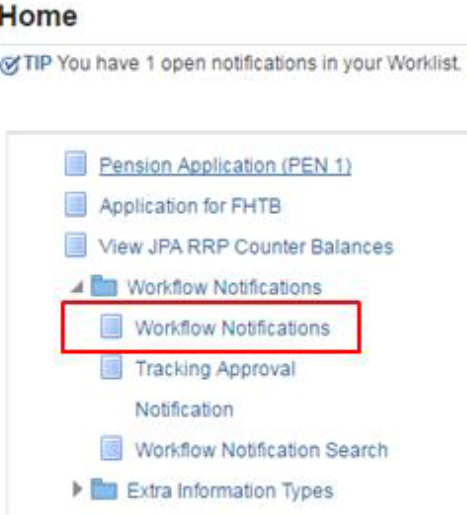
- click on the audit message
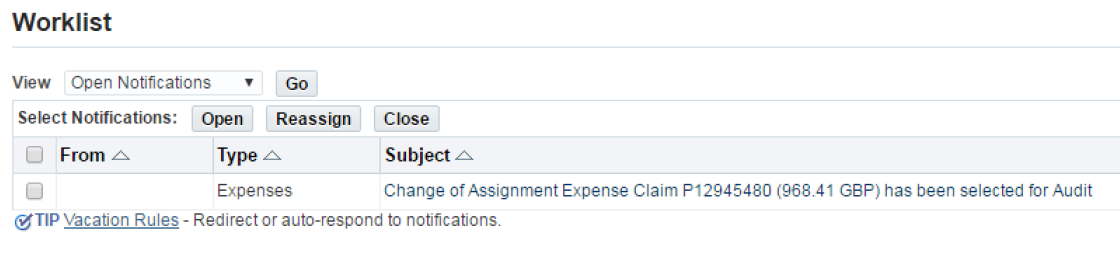
A new screen will be shown with a message informing you that the claim has been selected for audit. The Auditors details will be displayed.
- scroll down to see the full details of the claim in question
- click on Expense Claim Details
The Expense Report Summary screen will be displayed.
- click on the Printable Page button then on the printer icon to print your expense claim
- print out and complete the JPA F025 Expense Receipts Submission, Audit Confirmation and Retention Form
Attach the form to the copy of your claim that you have printed and submit to your Unit Auditor along with the following within 7 days:
- all associated original receipts and other documentation (DHRS Booking Confirmations)
- a screen print of your claim or your F016 claim form if the claim was made off line
- associated authority documentation (e.g. Course Joining Instructions)
If you are told a claim for an Advance of Travel & Subsistence or an Advance of Resettlement Course Costs has been selected for Audit, ignore this. There is no requirement to produce supporting paperwork in these circumstances as the claim is audited once cleared.
What you need to know
Here are some reasons why your expense claim has not been paid:
- credit memo/s on account
- wrong currency for receiving bank
- not authorised at HR Unit level
- future date entered for the the claim
- payment held for audit
- no bank details held on JPA
If an expense is returned to you, you have 30 days to open the claim, action it (update, correct) and re-submit. If you try and click on the claim after 30 days, you will receive an expected error and the claim details will not show anywhere on JPA. The claim will need to be re-submitted on a new expense claim.
After 90 days this closed claim will be removed from JPA automatically.
