What you need to know
It is important that you have read and understood JSP 760 - Tri-Service Regulations for Leave and Other Types of Absences before proceeding.
You will need to contact your Commanding Officer (CO) / Line Manager (LM) as soon as the illness or injury is established in order to gain authority to proceed on Self Certified Sickness Absence (SCSA) rather than reporting sick.
The maximum duration of any individual period of Self Certified Sickness Absence (SCSA) is 48 hours. This can only be submitted after approval from CO/LM and 48 hours after reporting ill. Where the individual remains ill after the 48-hour period they are to report sick to a healthcare professional at the beginning of the third day.
The maximum SCSA in any 12-month Annual Leave period is not to exceed 8 days.
You are required to submit SCSA within 28 days of the Authorised absence, contact your Unit HR Admin staff if you have been requested to apply SCSA after the 28-day period.
The maximum days of SCSA at any time is up to 2 days.
You cannot amend SCSA once it has been submitted in JPA Self Service.
What you need to do
To submit a SCSA request via JPA Next Gen, you will need to:
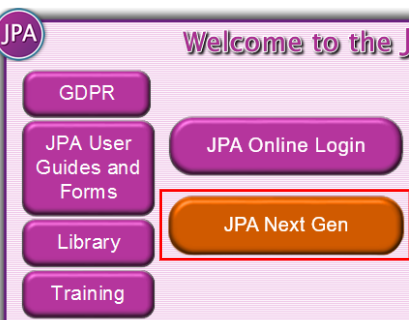
- logon to JPA using the JPA Next Gen Button
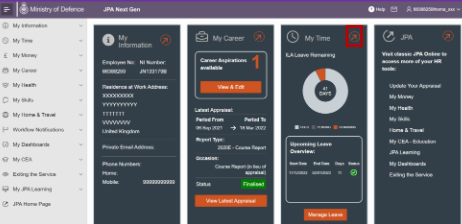
- click orange arrow in right hand corner of My Time
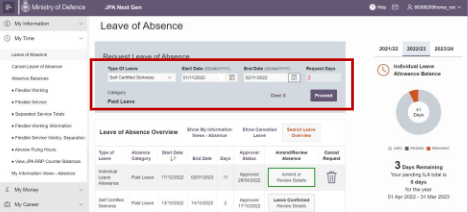
- click orange arrow in right hand corner of Leave of Absence
- select Self Certified Sickness as the Type of Leave, input Start and End Dates before selecting Proceed
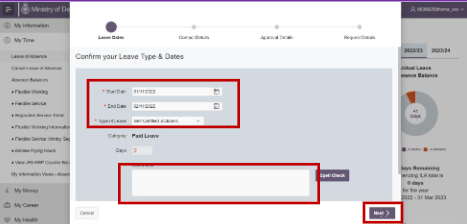
- a new screen will pop up to confirm the detail of the application. Confirm the dates and leave type correct, insert any comments for the authoriser and click Next
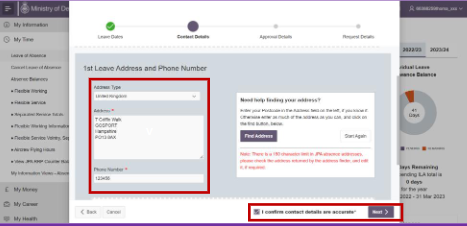
- insert Address and Phone Number over the period, confirm that contact details are correct and select Next
- insert any comments required to the approver and click Next
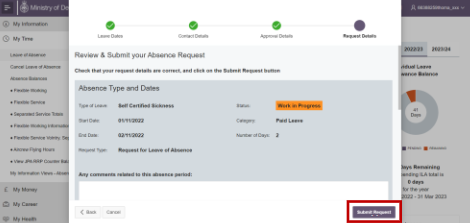
- check that the summary details are correct and click Submit Request
Check your Workflow Notifications to follow the progress of your leave application.
