What you need to know
You are able to view, and where possible update your Passport, European Health Insurance Card (EHIC) details, Visa details, your Religion, Unique Learner Number (ULN), and your Welcome Card Number.
Your Unique Learner Number (ULN) is a unique 10-digit number. Most learners aged 14+ have one and it’s designed to work with your Personal Learning Record (PLR) as proof of your learning and achievements.
Where to find your ULN
If you’re aged 14 to 19 your school, college or learning provider can give you your ULN reference. Since March 2013, awarding organisations have started to print ULN references on certificates.
What you need to do
To view and update your passport , EHIC, visa details and welcome card number, you will need to:
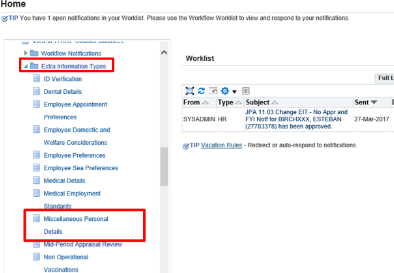
- logon to JPA and select JPA Self Service – Employee, Armed Forces
- select Extra Information Types
- click Miscellaneous Personal Details
The Miscellaneous Personal Details: Extra Information screen will be displayed.
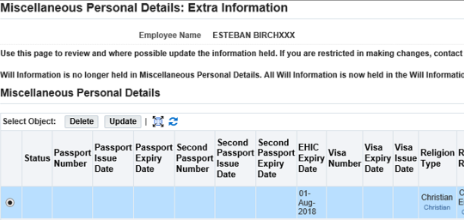
Click Update.
The Miscellaneous Personal Details screen will be displayed allowing you to make changes to your details. Please note that the Passport Number and Second Passport Number fields should only contain numerical values and should not be used to record any other information such as "No Passport Held".
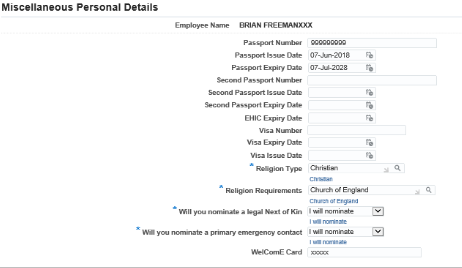
- enter the details of the changes you wish to make
- click Apply
- the Miscellaneous Personal Details: Extra Information screen will be displayed showing the status as Updated

- click Next
- the Miscellaneous Personal Details: Review screen will be displayed. It will show the changes you have made by displaying a blue dot against the entry you have amended

At this stage you can click the Back button if your changes are not correct or your wish to make further changes, or you can click the Submit button if you are happy with your changes.
You can then click Submit. A Confirmation screen is displayed confirming that your changes have been made.
What you need to know
You are able to view, and where possible update your Passport, European Health Insurance Card (EHIC) details, Visa details, your Religion, Unique Learner Number (ULN), and your Welcome Card Number.
Your Unique Learner Number (ULN) is a unique 10-digit number. Most learners aged 14+ have one and it’s designed to work with your Personal Learning Record (PLR) as proof of your learning and achievements.
Where to find your ULN
If you’re aged 14 to 19 your school, college or learning provider can give you your ULN reference. Since March 2013, awarding organisations have started to print ULN references on certificates.
What you need to do
To view and update your passport , EHIC, visa details and welcome card number, you will need to:
- logon to JPA and select JPA Self Service – Employee, Armed Forces
- select Extra Information Types
- click Miscellaneous Personal Details
The Miscellaneous Personal Details: Extra Information screen will be displayed.
Click Update.
The Miscellaneous Personal Details screen will be displayed allowing you to make changes to your details. Please note that the Passport Number and Second Passport Number fields should only contain numerical values and should not be used to record any other information such as "No Passport Held".
- enter the details of the changes you wish to make
- click Apply
- the Miscellaneous Personal Details: Extra Information screen will be displayed showing the status as Updated
- click Next
- the Miscellaneous Personal Details: Review screen will be displayed. It will show the changes you have made by displaying a blue dot against the entry you have amended
At this stage you can click the Back button if your changes are not correct or your wish to make further changes, or you can click the Submit button if you are happy with your changes.
You can then click Submit. A Confirmation screen is displayed confirming that your changes have been made.
