What you need to know
You can claim this allowance if you have to buy your meals from commercial retail outlets instead of the Service messing facility at your place of assignment. It can only be claimed if the meal you buy costs more than a meal at the mess and if the meal was missed as a result of your Service duties.
This benefit is available to single or unaccompanied Service personnel and members of the Volunteer Reserve forces. It is not for Service personnel who live in Service Families Accommodation, Substitute Service Families Accommodation, or privately owned or rented property.
It is important that you have read and understood JSP 752 Tri-Service Regulations for Expenses and Allowances (chapter 5, section 4) before proceeding.
Meals Out Expenses are paid either as a daily rate or an amount per meal. From 1 Feb 2021 the rates are as follows:
- breakfast £1.68
- main meal of the day (either midday or evening meal) £5.61
- third meal (midday or evening meal) £3.93
Daily Rate £11.22
You will then be paid via your nominated bank account.
You won’t be able to claim this benefit if you could bring in food from your normal place of residence for the duty period or if you claim any of the following allowances:
- food and incidentals allowance
- subsistence allowance
- special messing allowance
- lodging allowance
What you need to do
If you have a Defence Gateway account you can submit expenses from your own personal device on the MyExpenses app (part of the My Series).
You can also submit your claims monthly in arrears on JPA, remember that the iExpense Help button is available throughout should you require assistance:
- logon to JPA
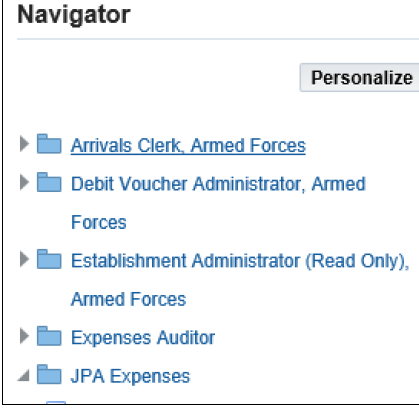
- select JPA Expenses
- click Create New Expense Claim
- populate the General Information screen - selecting Other Duty Travel for Type of Claim
- populate the Cash and Other Expenses screen
- enter start date of claim period in the Date Expense Incurred box
- enter appropriate details in the Justification box
- enter Number of Days claimed
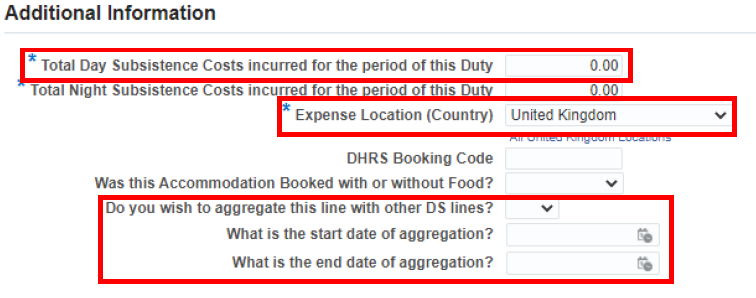
In Additional Information section enter:
- enter Total Day Subsistence (DS) Costs incurred for the period of this Duty
- note: DS claims can be aggregated by entering the combined total of DS during the period and entering the appropriate number of days claimed - refer to JSP 752 Chapter 5
- select Country e.g. United Kingdom from the Expense Location (Country)
- if aggregation of subsistence has occurred enter start and end date of aggregation
- click Update and check the reimbursable amount has updated correctly
- click Continue
- once you are content, click Next
- you may Save or Cancel your claim at this point by clicking the appropriate button, or make amendments by clicking on the Details icon
- click Next once you are content
The Expense Report Review screen will be displayed.
- check the details and if you are content that it is accurate and in accordance with extant policy click Save
- read and click the I accept the Terms & Conditions box
- click Submit
If you don’t have access to JPA, then you need complete JPA Form F016 selecting Expense Type 65 Meals Out Expense and Type of Claim Other Duty Travel and submit to your Unit HR Admin.
