What you need to know
Northern Ireland Journeys allowance is designed to give Service personnel a break from the extra pressures and restrictions of service in Northern Ireland, and to reduce the amount of time they’re separated from their families. It is available to all Regular and mobilised Reserve Service personnel who are permanently assigned to a resident unit in Northern Ireland, as well as their accompanying immediate families. This does not include roulement units, which are units that are deployed on short tours of duty, normally for 6 months.
It is important that you have read and understood JSP 752 Tri-Service Regulations for Expenses and Allowances (chapter 8, section 1) before proceeding.
The allowance is only available if you are going on, or returning from, leave.
Your Service will provide a plane or ferry ticket from Northern Ireland to Great Britain. You’ll also be able to claim a mileage allowance for travel to and from the airport or ferry port.
Single and unaccompanied Service personnel get 12 return journeys per assignment year.
Accompanied personnel get three family return journeys per assignment year. For Service couples who are both are assigned to Northern Ireland, it’s three return journeys per assignment year.
You won’t be able to claim this benefit if you claim Families Assistance for Visits Abroad or if you’re assigned to a unit resident in Northern Ireland but choose to work remotely outside of Northern Ireland.
What you need to do
- Apply for authority to travel - You should apply for authority to travel on JPA to generate an authorised journey number. To do this:
- logon to JPA
- click JPA Self Service - Employee, Armed Forces
- click JPA Journey Application Claim
- click Self Service Journey Claim
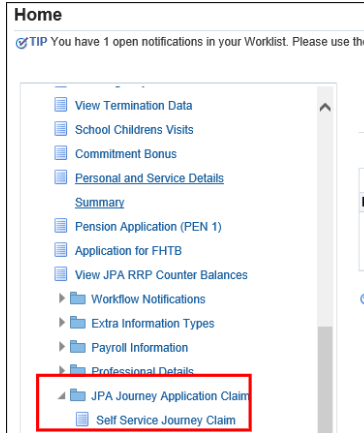
The Journey Application history will be displayed.
- click Balances to proceed to the Current Journey Balances

- select the appropriate journey type (you may only have 1 option showing) and press Continue
- select Persons Travelling by clicking the Select box next to their name
- click Continue
- use the drop-down menus to select Outbound/ Inbound leg
- use the drop-down menus to select Method of Travel e.g. air, bus, car, ferry, passenger in car, train
- use Add Journey Leg to insert next stage of travel
JPA cannot process half journeys (one way only), therefore when a half warrant (one way only) has been used you should contact your Unit HR Admin who can adjust your balance accordingly.
Where GYH(O) entitlement is to be split over 2 journeys on occasions when the Service Person is unable to accompany family members to the UK (for Service reasons) and provided travel is to the same qualifying address you should contact your Unit HR Admin who can adjust your balance accordingly.
Manually submitted claims or claims for GYH (EY)(OA) must also be adjusted manually by the Unit HR Admin − JSP 752 Part 2 Chapters 5 & 6 refers.
- click Continue when all legs complete
You will now see a review of your journey application.
- note down the Journey Number
When the journey application is approved the journey number will be required to make your claim using JPA iExpenses
- click Continue to submit your journey application
You will see a Confirmation page, again showing your Journey Number.
- click Exit to close the screen
If you have forgotten to note the Journey Claim details or would like an update on your request, go back into Self Service Journey Claim where this screen will show your Journey Number and current Status.
2. Arrange your tickets
To arrange tickets for your journey, you should then speak to your Unit HR Admin or Personnel Office or travel centre. Where possible a standard class warrant should be used.
3. Claim any costs incurred
You can also submit your claim via JPA, please refer to the Submitting an iExpense page for guidance and instructions.
If you don’t have access to JPA then need to complete JPA Form 016 selecting one of the Expense Types 71-74 and XXX Type of Claim and submitting to them.
If you have a Defence Gateway account you can submit expenses from your own personal device on the MyExpenses app (part of the My Series).
You will then be reimbursed via your nominated bank account.
