What you need to know
JPA accounts are password protected and therefore if unable to access JPA using your login credentials and are locked out of your account, you will need to request a password reset.
What you need to do
If you are locked out of your JPA account and require a password reset, you can do this by click the 'Forgot your password?' link on the login screen. You will need to follow the below steps:
- select 'Forgot your password?'
- enter your Username
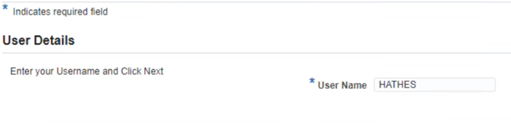
- click Next in the top right corner of the screen
The Verification Details screen will appear.
- enter all required verification detail fields
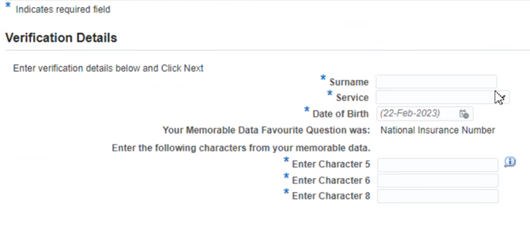
Tip: Your memorable data is the answer to the question you created using the ID Verification on the JPA Self Service - Employee responsibility.
- click Next
- (need content of actual p/w change screen)
If you are unable to reset your password after following the instructions above, you will need to contact the JPAC Enquiry Centre (EC):
- Phone: 0800 085 3600
- Phone (from overseas): 0044 141 224 3600
- Phone (military): 94560 3600
Before a JPA password can be provided, you will need to be identified and verified. You will need to provide:
- service number
- rank & full name
- 2 characters from your memorable data
If you are unable to pass the memorable data security question, the enquiry centre are unable to proceed. The memorable data will need to be updated before a password can be provided by the enquiry centre over the phone.
