What you need to know
If you’ve been given permission to use your own private vehicle (such as a car, motorbike or bicycle) to travel as part of your Service duties, you can claim Motor Mileage Allowance (MMA) from either your Duty Station or your Alternative Working Address if you are working remotely, to help cover the cost of your journey.
It is important that you have read and understood JSP 752 Tri-Service Regulations for Expenses and Allowances (chapter 6, section 4) before proceeding.
You can get permission by asking your Line Manager. If military transport is available for the journey, then that’s what you’ll need to use to get around – and that means you won’t be able to claim MMA.
If you use a motor vehicle, you’ll need to make sure that it is insured for business use with a valid MOT and road tax on the date of the journey.
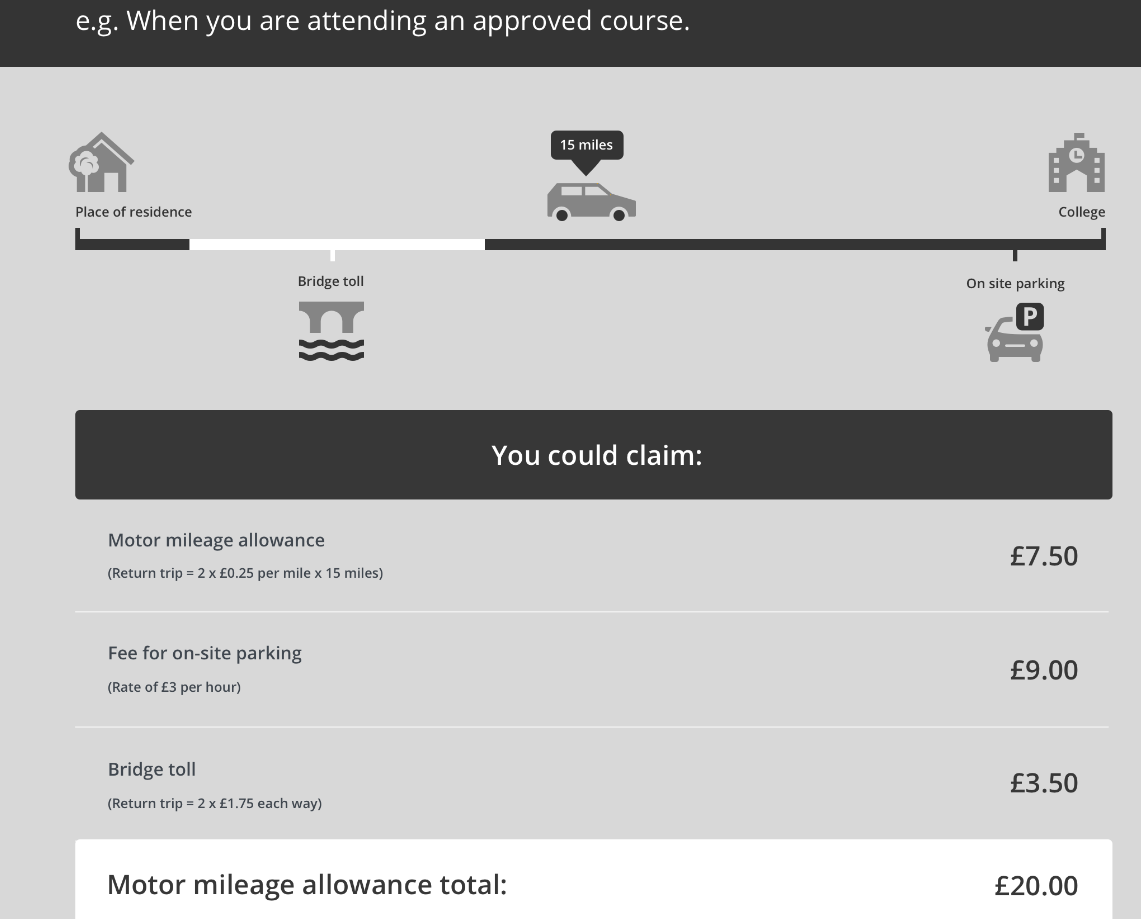
For journeys in the UK, you claim £0.25 per mile for all motor vehicles and £0.15 per mile for bicycles. There are different rates of MMA in overseas countries, which are available from your Unit HR/Unit Personnel Office or on the Allowances team defnet page (DefNet access required).
You can also claim back any reasonable charges that you have to pay as part of your journey, such as parking fees, tolls, inland ferry and congestion charges.
You can't claim this benefit when military transport is available.
Worked example:
What you need to do
If you have a Defence Gateway account you can submit expenses from your own personal device on the MyExpenses app (part of the My Series).
You can also claim on JPA - remember the iExpense Help button is available throughout should you require assistance:
- logon to JPA
- select JPA Expenses
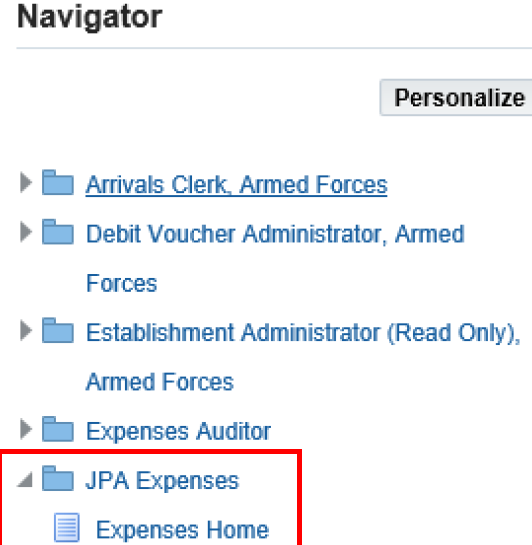
- click Create New Expense Claim

- choose a Reimbursement Currency from the List of Values (LOV) - this field defaults to GBP –Pound Sterling e.g. GBP - Pound Sterling
- select appropriate Type of Claim option from LOV .e.g. Change of Assignment, Compassionate Travel, Medical and Dental, Other Duty Travel, Representative Sport, Resettlement
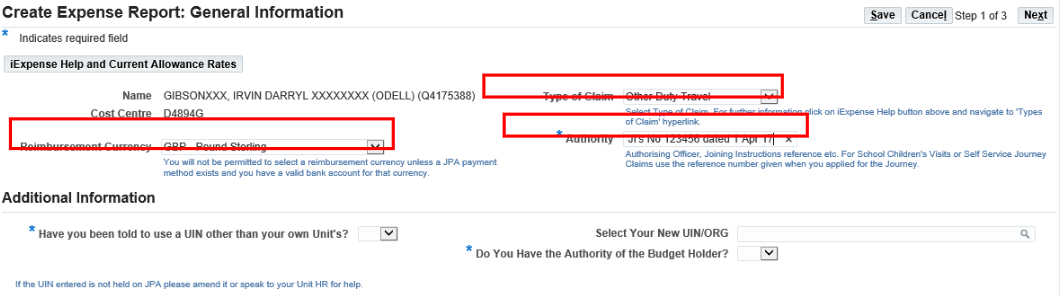
- enter the Authority for the claim .e.g. Course Joining Instruction details etc
- do you need to change your unit identity number (UIN)?
- select Yes from LOV in Have you been told to use a UIN other than your own Units? field
- select new UIN/ORG from LOV in Select Your New UIN/ORG field
- insert Yes or No in Do you have the Authority of the Budget Holder field
- click Next
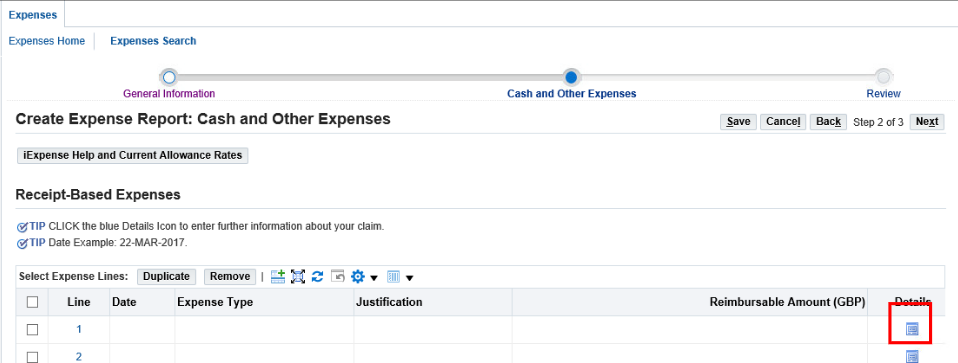
- click the Details icon
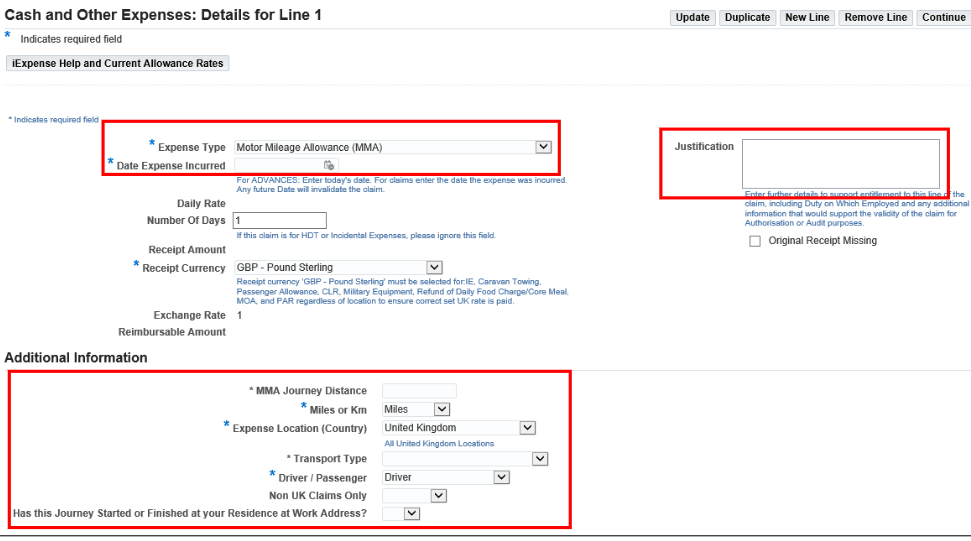
- select Motor Mileage Allowance (MMA) in Expense Type field
- enter Date Expense Incurred
- enter details in the Justification box as appropriate
- in the Additional Information section enter:
- MMA Journey Distance
- Expense Location (Country) –select from the drop-down list.
- Miles or Km–select from the drop-down list
- Transport Type-select from the drop-down list.
- Driver / Passenger-select from the drop-down list
- if you are claiming for overseas MMA you must answer the Non UK Claims Only question (was the fuel duty paid / duty free).
- if you are a HDT Automatic claimant you are to answer the Has this journey started or finished at your Residence at Work Address?
- click Update and check the reimbursable amount has been updated
- click Continue
A summary of your claim will be displayed.
- click Next
The Expense Report Review screen will be displayed.
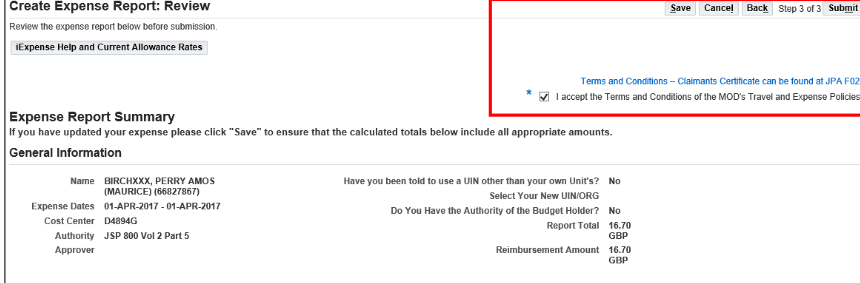
- check the details and if you are happy click Save, otherwise click on Back to amend the claim
- click the I accept the Terms & Conditions box
- click Submit
If you don’t have access to JPA, then you need complete JPA Form F016 and submit it to your Unit HR Admin selecting Expense Type 68 for Motor Mileage Allowance and XXX as Type of Claim (need this)
