What you need to know
You are able to update all other addresses within JPA should you need to. If you are updating an existing address that is your main address where mail is sent, you should notify HM Revenue & Customs (HMRC). If you are unsure of the HMRC address, please contact your Unit HR Admin.
What you need to do
To update your other address information within JPA, you will need to:
- scroll down to Other Address area, you will see either an Add or Update button in this section
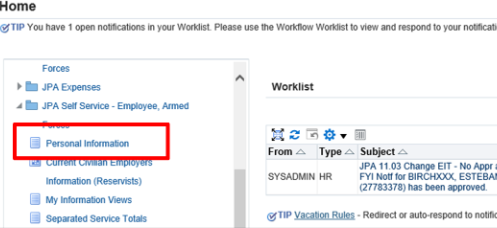
If you see an Add button you do not currently have an Other Address in the personal information. If you see an Update button it means that you already have an address which you can update or you can add an additional address.
You will then need to:
- click Add
- the ‘Other Address: Enter New Address’ screen will be displayed
- when selecting the ‘Type’ of address from the available list the option ‘Temporary Offer Address’ should never be selected
- enter the effective date of the change
Future dates are not to be entered when creating or updating a primary address, except when recording a post-discharge address, in which case the latest date that may be used is the last day of service.
Post-discharge address is used to distribute certificates of service, P45s and return Wills of Service leavers, as well as providing a reserve liability correspondence address. Address details recorded with an effective date later than the last day of service will be deleted.
Updating the primary address to a post-discharge address will not populate the Resettlement post-discharge contact details. This must still be done by the Service leaver using JPA self-service.
- enter your Other Address details in the required fields
- click Next
The Personal Information: Review screen will be displayed and show the fields in which changes have been made. This is indicated by a small blue dot icon.
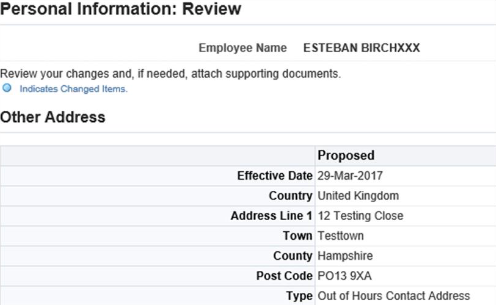
If you realise you have made a mistake you can click the Back button and make some changes. If you do not want to keep the information you have changed, click the Cancel button.
Click Submit and the 'Confirmation’ screen will be displayed showing your changes have been applied.
Update existing address
To update an existing address within JPA, you need to:
- click Update
- the Other Address: Choose Option screen will be displayed
- if you need to correct some information that is already in your address record you will need to select the Correct, Amend or Delete this Address radio button
- if you need to change your address following a move you will need to select the Enter a New Address if you have moved radio button
- click Next
- the Other Address: Correct Address screen will be displayed
- enter your amendments in the relevant fields
- when selecting the ‘Type’ of address from the available list the option ‘Temporary Offer Address’ should never be selected
- click submit
