What you need to know
You are able to add and update your residence at work address on JPA.
Please Note: When changing a Residence at Work Address you should inform HM Revenue & Customs if this is your main address where your mail is sent. Contact your Unit HR Admin for the HMRC address.
What you need to do
To update your residence at work address you need to:
- click Update in the Residence at Work Address section of the Personal Information home page
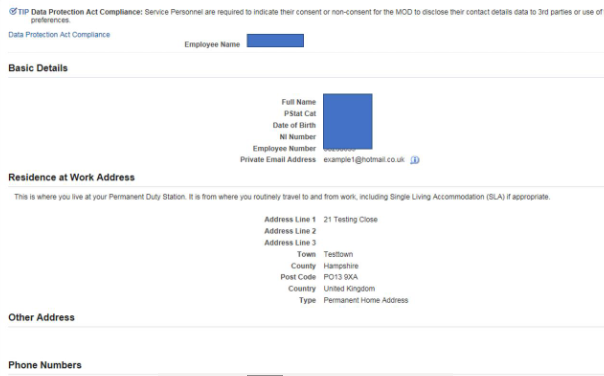
- click Update in the Residence at Work Address section
The ‘Main Address: Choose Option’ screen will be displayed.
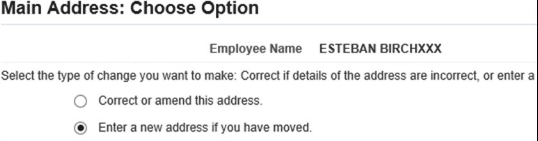
If you need to correct some information that is already in your address record you will need to:
- click Correct or amend this address radio button
The Residence at Work Address: Correct Address screen will be displayed.
- enter your changes in the appropriate fields
- when selecting the ‘Type’ of address from the available list the option ‘Temporary Offer Address’ should never be selected
- click Next
The Personal Information: Review screen will be displayed showing the details that you have entered. These will be indicated by a small blue dot icon.
- if you have made a mistake you can click the Back button and make further changes
- if you do not want to keep the information you have changed click the Cancel button
- click Submit
The Confirmation screen will be displayed showing the changes have been applied.
Enter a new address
If you need to change your address following a move you will need to:
- select Enter a new address if you have moved radio button
The Main Address: Enter New Address screen will be displayed.
- enter your new details in the appropriate fields, including the Effective Date
- when selecting the ‘Type’ of address from the available list the option ‘Temporary Offer Address’ should never be selected
- click Next
The Personal Information: Review screen will be displayed showing the details that you have entered. These will be indicated by a small blue dot icon.
- if you have made a mistake you can click the Back button and make further changes
- if you do not want to keep the information you have changed click the Cancel button
- click Submit
The Confirmation screen will be displayed showing the changes have been applied.
